Accounting
Restaurant accounting built into your POS: P&L, balance sheet and cash flow
Stop rebuilding your books from receipts at the end of the month. LoungeOS turns every paid order and every stock purchase into balanced journal entries, then produces the three statements your accountant and your bank ask for.
30-day free trial · No credit card · Works without internet
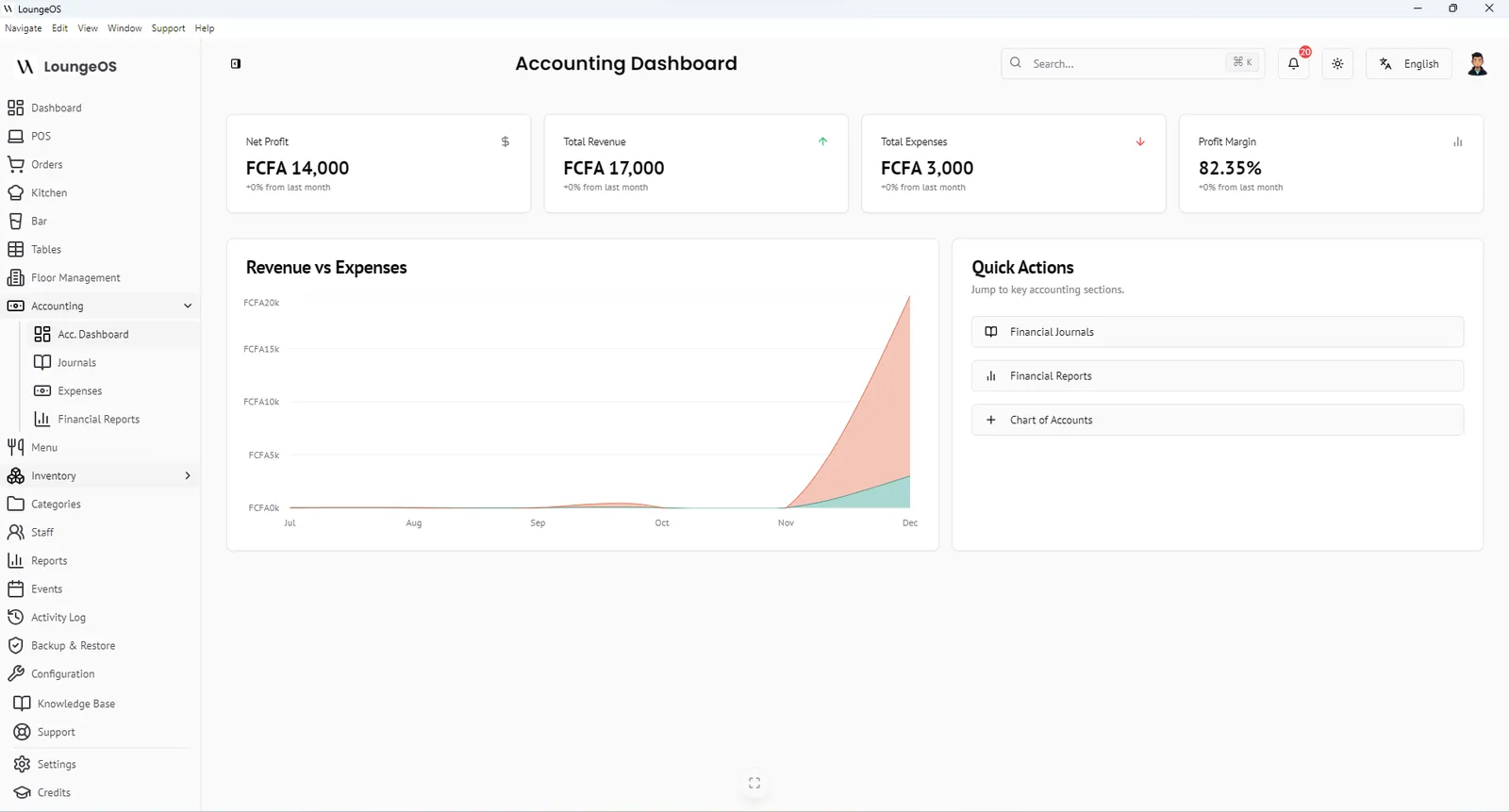
Most restaurants run two disconnected systems: a till that knows what was sold, and an accountant who rebuilds the month from receipts, bank statements and notebooks. LoungeOS includes a double-entry accounting ledger fed directly by your POS and inventory. Your sales, purchases, expenses and profit are always one click away from being up to date.
What’s included
- Accounting dashboard with net profit, total revenue, total expenses, profit margin and a revenue-vs-expenses chart
- Chart of accounts in five classes (assets, liabilities, equity, revenue, expenses), with your own sub-accounts
- Financial journals listing every entry with reference, date and amount
- Expense recording for rent, salaries, utilities, marketing, maintenance and other running costs
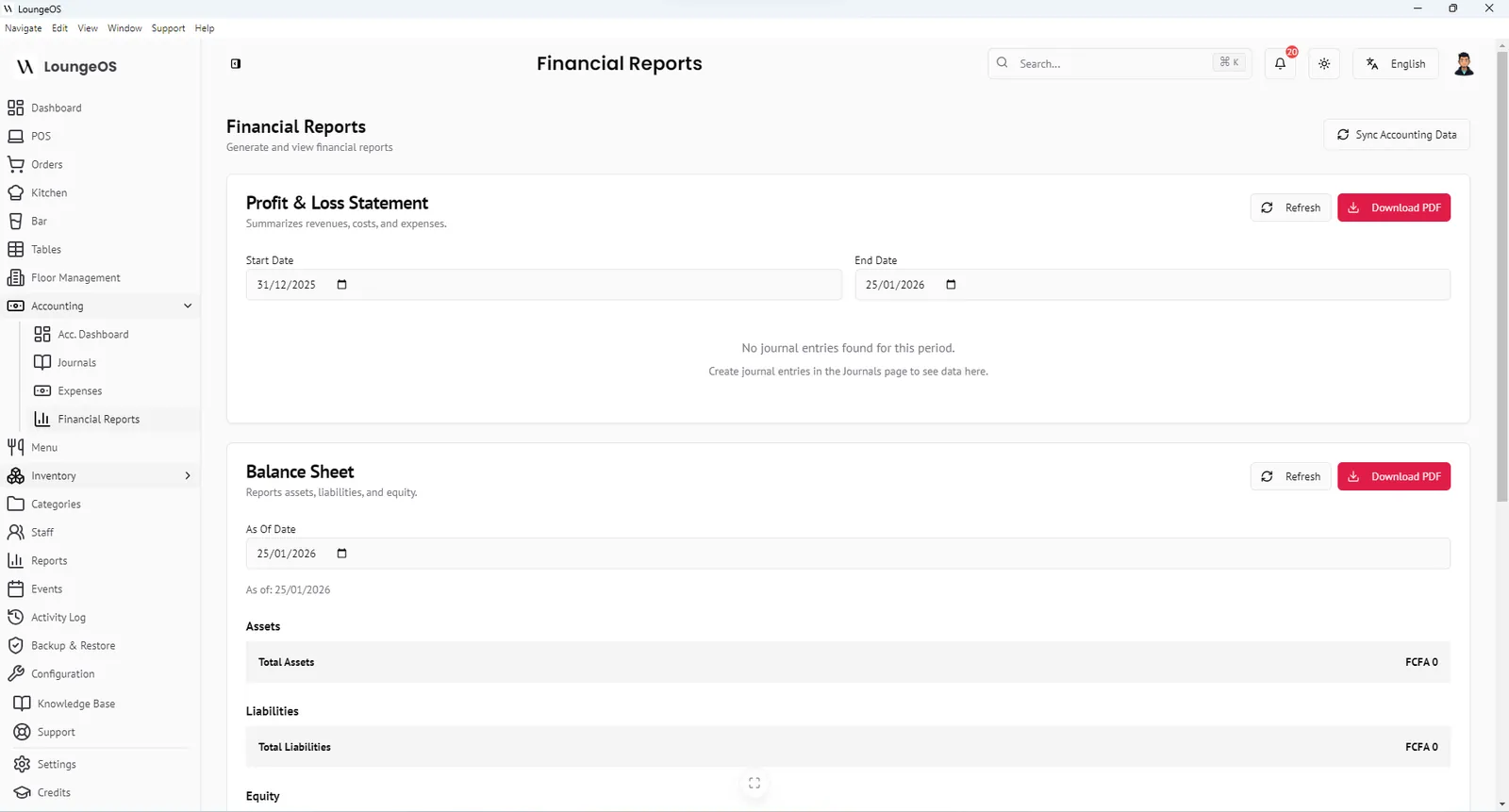
- Three financial statements: income statement (P&L), balance sheet and cash-flow statement, for any date range, exported to PDF or CSV
From sale to statement in one click
LoungeOS deliberately does not post every sale to the ledger in real time, because that would slow the POS during a rush. Instead, the owner or accountant clicks Sync Accounting Data and picks a date range. LoungeOS then:
- Reads every paid POS order and every recorded stock-in purchase in that period.
- Creates balanced journal entries automatically:
- Sales: debit Cash or Bank, credit Sales Revenue
- Purchases: debit Inventory or Cost of Goods Sold, credit Cash or Accounts Payable
- Updates the financial statements immediately.
Stock written off as damage, waste or loss in inventory is recorded as an expense, so your P&L reflects real losses instead of hiding them.
Built-in safeguards
- Debits must equal credits. LoungeOS will not save a manual journal entry that does not balance.
- Balance sheet check. The balance sheet confirms that Assets = Liabilities + Equity.
- Separation of duties. The Accountant role has full access to accounting but cannot take orders. Managers can sync and view. See roles and permissions.
The default chart of accounts
| Class | Example accounts |
|---|---|
| Assets | Cash on hand, bank accounts, inventory |
| Liabilities | Supplier payables, taxes owed |
| Equity | Owner’s capital, retained earnings |
| Revenue | Food sales, beverage sales, event services |
| Expenses | Cost of goods, rent, utilities, staff wages, waste and loss |
You can add child accounts under any parent, for example separate accounts for MTN MoMo and Orange Money balances, or for each bank.
Who it’s for
LoungeOS accounting is designed for owners and managers who want to see whether the business makes money, and for accountants who want clean, balanced data instead of a shoebox of receipts. It does not replace your accountant or your local tax filings. It gives them accurate numbers to work from. In OHADA countries, your accountant can map LoungeOS accounts to the SYSCOHADA chart when preparing statutory accounts.
Frequently asked questions
Why are my financial statements empty after a busy day?
Sales are posted to the ledger when you click Sync Accounting Data, not one by one during service. Sync the date range and the statements update.
Can I record expenses that don’t come from stock?
Yes. Use Record expense for rent, salaries, utilities, marketing, maintenance and other costs, with payee, date, payment account and category.
Can I export statements for my accountant or bank?
Yes. The income statement, balance sheet, cash-flow statement and journal can be downloaded as PDF or CSV for any date range.
Does LoungeOS file my taxes?
No. LoungeOS calculates taxes on bills using the rates you configure and gives you accurate records. Filing remains with you or your accountant.
Run your next service on LoungeOS
Install LoungeOS on a Windows computer, connect your tablets and phones over Wi-Fi, and run real service for 30 days. Free, no credit card.
Explore more
Restaurant accounting basics
P&L, balance sheet, cash flow, COGS and a monthly routine for owners.
Read guide →
Food cost percentage: formula and benchmarks
Calculate food cost and plate cost, compare benchmarks and lower yours.
Read guide →
15 restaurant KPIs with formulas
Sales, costs, speed and control metrics, and where to find them.
Read guide →